









GPT Image 2.6: GIF and SVG Output, a New Complexity Dial, and How It Compares to 2.5 Flare
OpenAI released GPT Image 2.6 on November 4, 2026, in two API models: gpt-image-2.6-flare for fast iteration and gpt-image-2.6-sunburst for detailed work. The new features are animated GIF output, SVG output, a complexity setting that controls how much the model plans before it draws, and markup-guided edits in the API. Per-token prices are the same as GPT Image 2.5. ChatGPT's free tier includes it. On aiwith.chat, the AI Image robot still runs GPT Image 2.5 Flare today, and we are integrating 2.6 now.
Last checked: November 5, 2026. This post is based on OpenAI's docs and changelog plus launch coverage, not on our own benchmark.
What's new in GPT Image 2.6
According to OpenAI's API changelog and the image generation guide, both 2.6 models support:
- Animated GIF output. You can generate a short looping animation straight from the Image API. The prompt OpenAI's partner OpenArt published at launch asks for "exactly 6 sequential frames in a precise 3 columns × 2 rows grid" on one sprite sheet, with a fixed camera and the same character and background in every frame. The model draws all six frames in one image instead of running a video model, which keeps faces, clothes and props consistent across frames (QbitAI).
- SVG output. It can output vector graphics that scale without blur. That covers icons, UI components and simple illustrations you can drop into a web page without a separate bitmap-to-vector step.
- A
complexitysetting (low,medium,high; the default ishigh). Complexity sets how much planning the model does before it renders. Thequalitysetting still controls rendering detail on its own. OpenAI suggests low complexity for small, focused edits, like changing a background or a sign, and high complexity for dense text, complex layouts and many objects. Complexity has no separate fee, but higher complexity takes longer and can make changes you didn't ask for. - Markup-guided edits. You send an annotation layer, for example a red circle around a vase, and describe the change in the prompt. Until now this circle-and-edit flow was only in the ChatGPT app. It now works on
POST /v1/images/editsfor both 2.5 and 2.6 models.
On speed, launch coverage reports total generation time cut by about 50%, with Flare producing a low-quality image in as little as 6 seconds (QbitAI). OpenAI's docs don't give a latency number, so treat this as a launch claim.
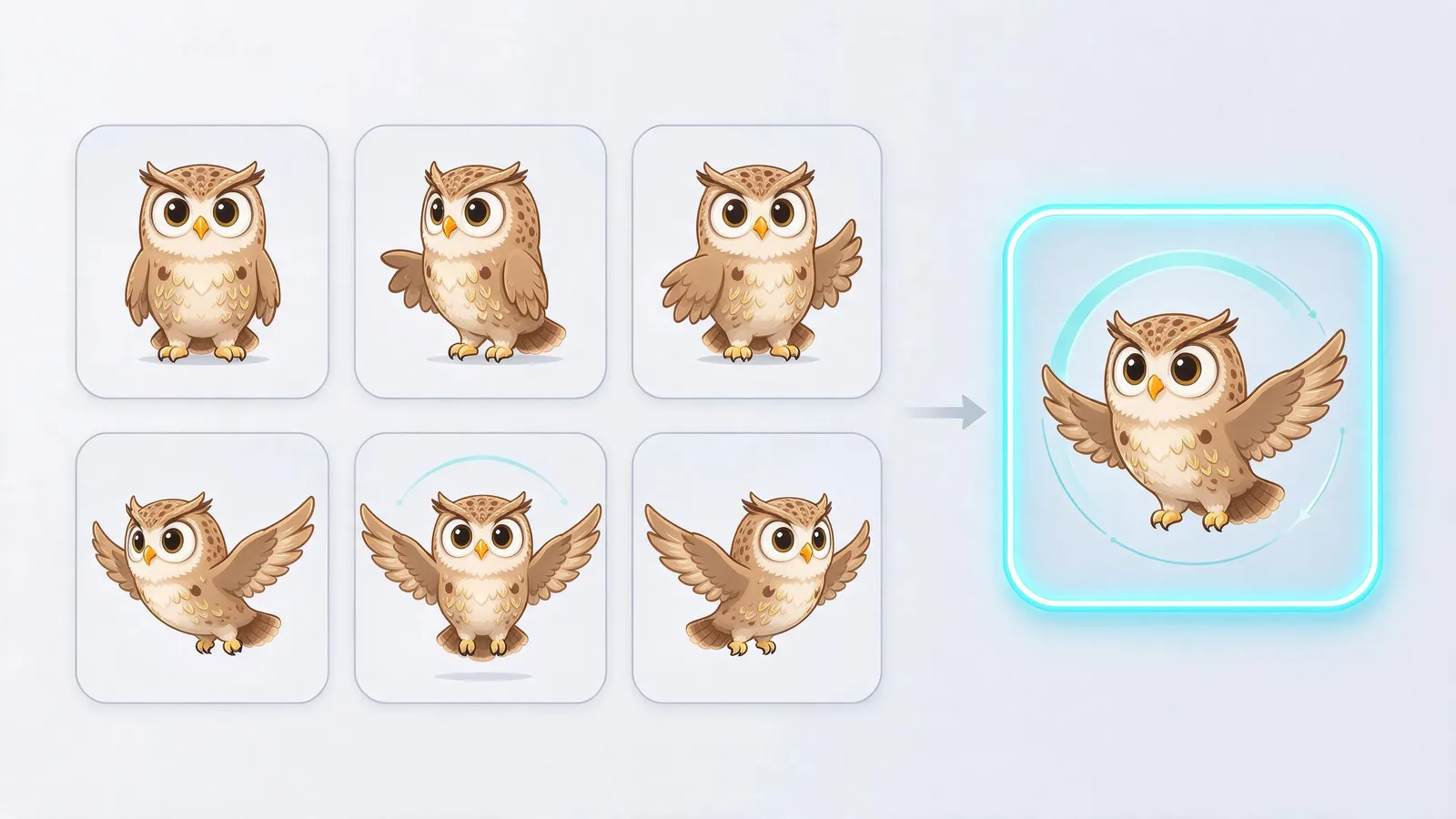 A sprite sheet of six animation frames arranged in a 3 by 2 grid turning into a looping animation
Flare vs Sunburst: which 2.6 model to pick
The two models cost the same per token. They differ in the job they are tuned for:
- Flare is built for speed and layout: posters, product shots, social graphics, quick drafts and back-and-forth iteration.
- Sunburst is built for detail and consistency: medium and high quality output, and multi-round edits where people and products shouldn't drift from one version to the next.
If you are making many variations and picking the best, start with Flare. If you are editing one image over several rounds, use Sunburst.
GPT Image 2.6 vs GPT Image 2.5 Flare
GPT Image 2.5 Flare launched in September 2026 and is the model most people use through apps today. Here is what changes when you move to 2.6:
- Price: no change. Both list $8 per 1M image input tokens, $30 per 1M image output tokens, and $5 per 1M text input tokens (2.6 Flare, 2.5 Flare).
- Output formats: 2.6 adds GIF and SVG. 2.5 Flare only outputs bitmaps.
- Control: 2.6 adds
complexity. With 2.5, small edits still go through full scene planning. With 2.6 you can turn planning down and keep quality high. - Markup edits: both have them. OpenAI added markup to the edits endpoint for 2.5 and 2.6 at the same time, so this alone isn't a reason to switch.
- Where you can call it: 2.5 Flare still covers more of the API. On launch day the 2.6 model pages list only the Image API's generations and edits endpoints. The Responses API image tool and the Batch API (which halves the image output price to $15/M on 2.5 Flare) are marked "not supported" for 2.6.
So 2.6 doesn't simply replace 2.5. It's the same price with new output types and more control. If you rely on Batch pricing or call image generation through the Responses API, stay on 2.5 for now.
How to use GPT Image 2.6 for free
- ChatGPT. OpenAI rolled 2.6 out in ChatGPT, Codex and the API for both free and paid users (QbitAI). Free accounts have usage limits, and OpenAI doesn't publish an exact image count.
- The API isn't free. It bills per token at the prices above. OpenAI has no free API tier.
Try it on aiwith.chat
We won't claim we already have it: the AI Image robot on aiwith.chat currently runs GPT Image 2.5 Flare. Our integration of 2.6 started on November 5. When it is live, we will update this post, and the model dropdown will show it.
Until then, the AI Image robot gives you GPT Image 2.5, Nano Banana Pro, Seedream 5.0 and Qwen Image 2.0 in one place. You can send the same prompt to each and keep the best result. New accounts get free credits with no credit card. After that, image generation shares the same $9.9/month plan as GPT-6 Astra, Claude, Gemini and DeepSeek chat (pricing).
Open AI Image on aiwith.chat →
Is it worth switching?
It depends on what you make:
- You make stickers, mascots, reaction GIFs or short loops. Yes. Native GIF output is the one 2.6 feature nothing else in this lineup offers. Use the 3×2 sprite-sheet prompt pattern above.
- You build websites or apps and need icons or illustrations. Yes, for SVG. Vector output saves the conversion step and scales cleanly.
- You do repeated edits on one image, like product photos or a recurring character. Try Sunburst with low complexity. It is meant to change only what you ask for.
- You make one-off images for posts or slides. No rush. 2.5 Flare produces the same kind of bitmap at the same price, and the gains you'd see are speed and control, not a different image.
- You run large batch jobs through the API. Wait. 2.6 doesn't support the Batch API yet, so 2.5 Flare is half the price for that workload.
Related reading
- FLUX 3 Image Klein: Is It Free, and How Do You Use It?
- GPT-6 Astra: What OpenAI's Next Model Means
- How to Use GPT-6 Astra for Free
Sources: